> ## Documentation Index
> Fetch the complete documentation index at: https://docs.tqx.ai/llms.txt
> Use this file to discover all available pages before exploring further.
# Analyze a factor
> Run a factor analysis and keep each result tied to its code version and parameters.
Factor analysis sorts the available universe into groups by factor value and measures the forward behavior of each group. It is a research run, not an order simulation.
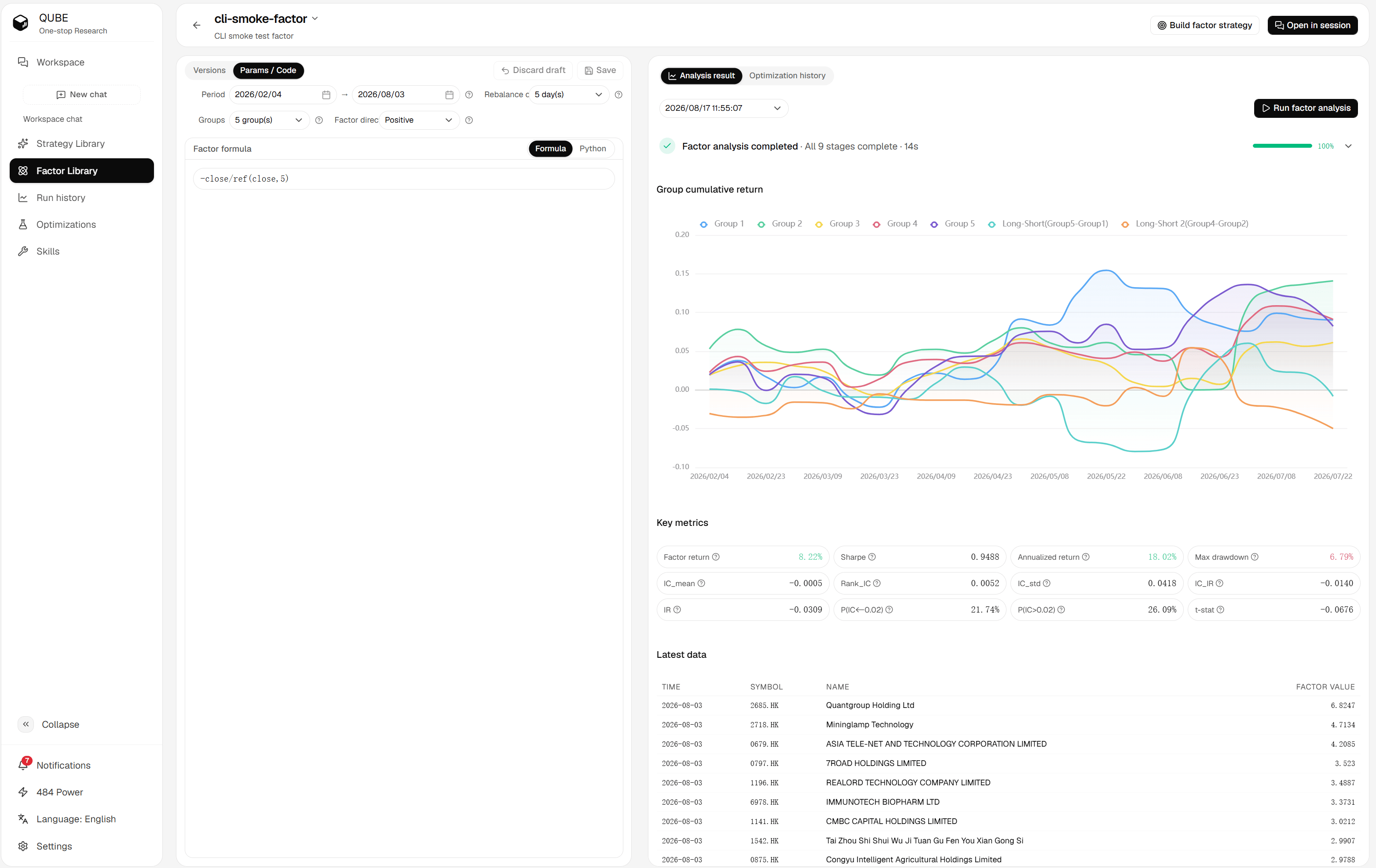 ## Configure an analysis
Set the following fields in the left-side parameter panel:
| Parameter | What it controls |
| ---------------- | ------------------------------------------------------- |
| Period | The start and end dates used for the analysis. |
| Rebalance cycle | How often the groups are rebuilt during the evaluation. |
| Groups | The number of cross-sectional buckets, from 2 to 20. |
| Factor direction | Positive or negative interpretation of larger values. |
Hong Kong and US factors use their selected market universe.
## Run the analysis
1. Review the current code and parameters.
2. Click **Run factor analysis** in the result panel.
3. Wait for the progress stages to finish, or cancel the task if you no longer need it.
4. Use the analysis history selector to switch between completed runs.
Qube saves the current code snapshot before it submits a run when the code or writing mode changed. The run then stores its exact dates, groups, direction, and market universe, so later edits do not change the meaning of the historical result.
Changing only the analysis controls does not rewrite the factor code. Treat every run as a separate experiment and compare its saved parameters with the result you are reviewing.
## Continue
* [Read analysis results](/research/factor/results)
* [Manage factor versions](/research/factor/versions)
* [Optimize factor parameters](/research/factor/optimization)
## Configure an analysis
Set the following fields in the left-side parameter panel:
| Parameter | What it controls |
| ---------------- | ------------------------------------------------------- |
| Period | The start and end dates used for the analysis. |
| Rebalance cycle | How often the groups are rebuilt during the evaluation. |
| Groups | The number of cross-sectional buckets, from 2 to 20. |
| Factor direction | Positive or negative interpretation of larger values. |
Hong Kong and US factors use their selected market universe.
## Run the analysis
1. Review the current code and parameters.
2. Click **Run factor analysis** in the result panel.
3. Wait for the progress stages to finish, or cancel the task if you no longer need it.
4. Use the analysis history selector to switch between completed runs.
Qube saves the current code snapshot before it submits a run when the code or writing mode changed. The run then stores its exact dates, groups, direction, and market universe, so later edits do not change the meaning of the historical result.
Changing only the analysis controls does not rewrite the factor code. Treat every run as a separate experiment and compare its saved parameters with the result you are reviewing.
## Continue
* [Read analysis results](/research/factor/results)
* [Manage factor versions](/research/factor/versions)
* [Optimize factor parameters](/research/factor/optimization)