> ## Documentation Index
> Fetch the complete documentation index at: https://docs.tqx.ai/llms.txt
> Use this file to discover all available pages before exploring further.
# Create a factor
> Create a market-specific factor in the Qube Factor Library.
Create a factor when you have a signal hypothesis that you want to evaluate independently from trading rules.
## Create from the Factor Library
Open **Factor Library**, choose **+ HK factor** or **+ US factor**, and open the new factor. The market is fixed when you create the factor, so choose it carefully.
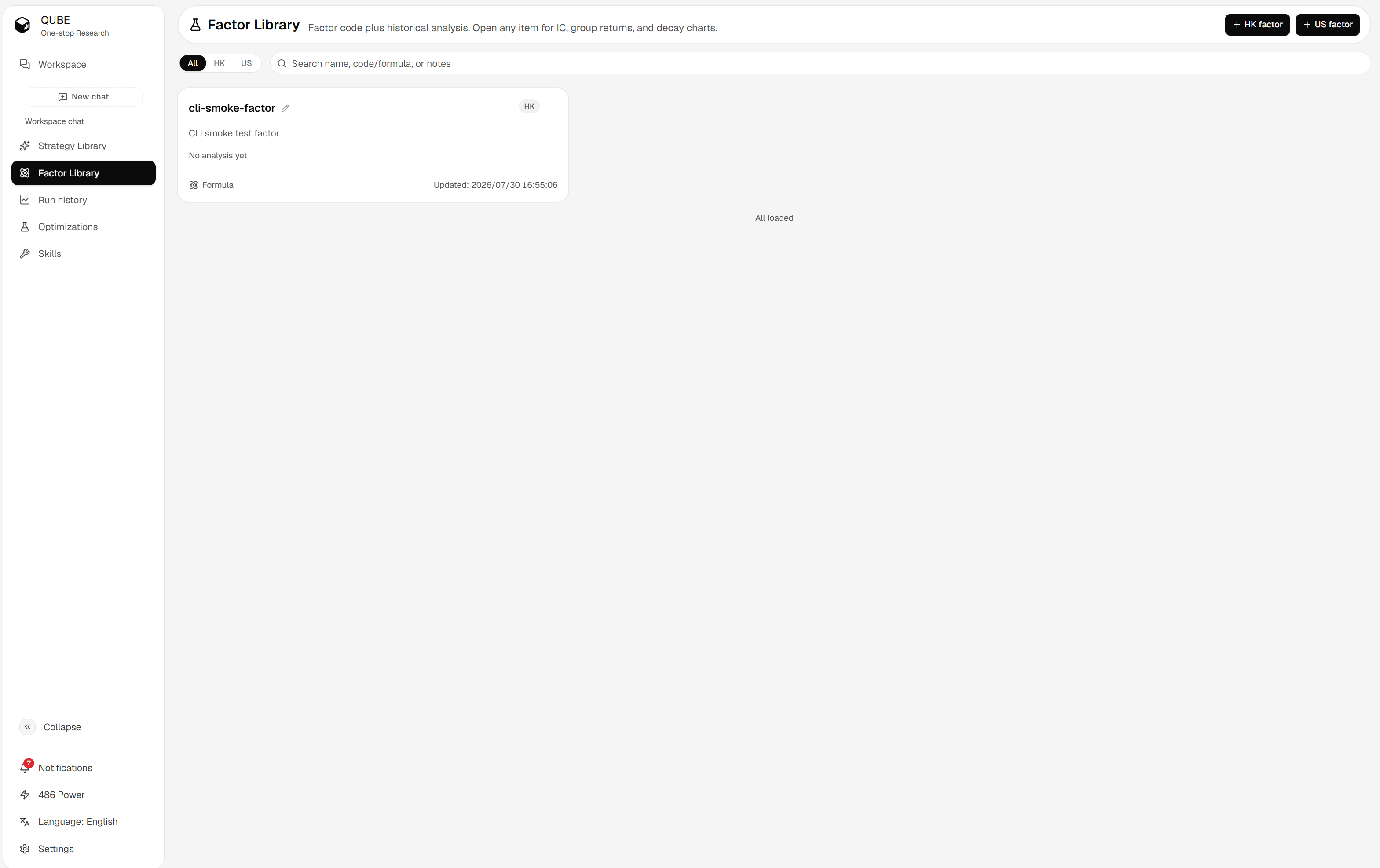 The library supports market filters and a debounced search across factor names, code or formulas, and notes. Each card shows the code type, latest update time, and a performance preview when a successful analysis exists.
## Set the factor identity
Give the factor a name that describes the signal, then add a short note about its hypothesis. For example, mention whether the signal measures momentum, value, quality, volatility, or a combination.
Qube saves the name, note, code, and writing mode automatically. A saved code or code-type change creates a new factor version when it differs from the latest version.
## Choose the writing mode
* **Formula**: Use one expression per line with supported fields and operators.
* **Python**: Use one `Factor` class when the signal needs custom time-series logic.
See [Write factor code](/research/factor/code) for the syntax and validation rules.
Changing the market is not a way to reuse a factor across datasets. Create a factor for the target market and review its available fields before you write code.
The library supports market filters and a debounced search across factor names, code or formulas, and notes. Each card shows the code type, latest update time, and a performance preview when a successful analysis exists.
## Set the factor identity
Give the factor a name that describes the signal, then add a short note about its hypothesis. For example, mention whether the signal measures momentum, value, quality, volatility, or a combination.
Qube saves the name, note, code, and writing mode automatically. A saved code or code-type change creates a new factor version when it differs from the latest version.
## Choose the writing mode
* **Formula**: Use one expression per line with supported fields and operators.
* **Python**: Use one `Factor` class when the signal needs custom time-series logic.
See [Write factor code](/research/factor/code) for the syntax and validation rules.
Changing the market is not a way to reuse a factor across datasets. Create a factor for the target market and review its available fields before you write code.