TQX is PandaAI’s international platform for AI-assisted quantitative research and trading. You can research factors, backtest strategies, test them in simulation accounts, and connect supported live brokerage accounts.
Qube supports factor and strategy research, backtesting, and optimization.
Agent Factory is being developed to support agent workflows. Availability and release details will be announced separately.
Research: use Qube to create and evaluate factors and strategies.
Simulation: use TQX CLI with a coding agent to test a strategy in a simulation account.
Competition: enter GATC with a supported live brokerage account and an original AI strategy executed through TQX CLI. Participants must be at least 18 and meet the applicable securities trading and competition eligibility requirements.
Install TQX CLI, connect a simulation account, and test the strategy’s execution.
3
Choose whether to compete
If you choose to enter GATC, review the competition FAQ and connect a supported live brokerage account. Simulation results do not count toward competition rankings.
Do I need separate accounts for research, simulation, and competition?
Your TQX login gives you access to Qube. Simulation accounts and live trading accounts are separate account types managed under that login. To enter GATC, link a supported live brokerage account.
CLI stands for command-line interface. TQX CLI lets you or a coding agent sign in to TQX, use Qube research tools, and manage trading accounts from a terminal. See the CLI guide.
An AI agent can plan steps, call tools, and use their results to continue a task. A coding agent with terminal access can use TQX CLI for workflows that involve research, backtesting, and simulation. Examples include Codex, Claude Code, and Cursor. You can also run CLI commands yourself.
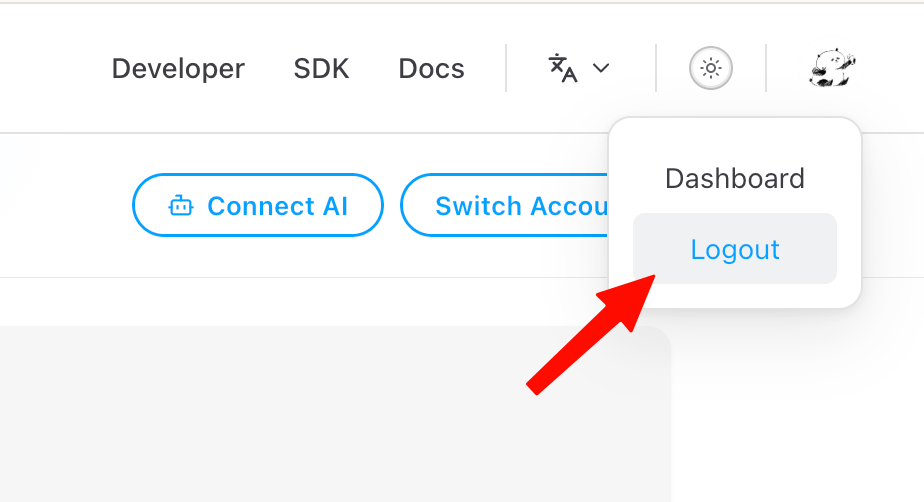
If TQX displays Unsupported broker after you selected a different broker on LongPort, open the LongPort dashboard. Click your profile picture in the upper-right corner and select Logout.
{"docsConfig":{"theme":"luma","$schema":"https://mintlify.com/docs.json","name":"TQX Docs","colors":{"primary":"#1A1A17","light":"#FFF200","dark":"#FFF200"},"logo":{"light":"https://mintcdn.com/tqx/66zcioqNvIHRXn8E/logo/tqx-black.png?fit=max\u0026auto=format\u0026n=66zcioqNvIHRXn8E\u0026q=85\u0026s=c4c6b5292e757b2100f69c05b87fc8ae","dark":"https://mintcdn.com/tqx/66zcioqNvIHRXn8E/logo/tqx-white.png?fit=max\u0026auto=format\u0026n=66zcioqNvIHRXn8E\u0026q=85\u0026s=26b21234db9f7f60608d3ceb50ed9527","href":"https://www.tqx.ai/"},"favicon":"https://mintcdn.com/tqx/VkYrSdTAbYa4ufY1/logo/tqx.png?fit=max\u0026auto=format\u0026n=VkYrSdTAbYa4ufY1\u0026q=85\u0026s=41fd477c0277e219808279248f115864","appearance":{"default":"dark"},"background":{"color":{"light":"#FAF9F5","dark":"#08090B"}},"navbar":{"links":[{"href":"mailto:audrey@tqx.ai","label":"Support"}]},"footer":{"socials":{"x":"https://x.com/tqx_trade","github":"https://github.com/tqx-ai","linkedin":"https://www.linkedin.com/company/tqx-ai","discord":"https://discord.gg/nptGYBAJyy","telegram":"https://t.me/+KHeySI7Iyd1lM2I0","instagram":"https://www.instagram.com/tqx.ai"}},"contextual":{"options":["copy","view","chatgpt","claude","perplexity","mcp","cursor","vscode"],"display":"header"},"styling":{"latex":false},"navigation":{"languages":[{"language":"en","default":true,"href":""},{"language":"zh-Hant","href":"hk"}]}},"deployment":{"deploymentMetadataValue":{"subdomain":"tqx","hasAudioNarration":false,"actualSubdomain":"tqx","customDomains":["docs.tqx.ai"],"gitSource":{"type":"github","owner":"tqx-ai","repo":"tqx-docs","deployBranch":"main","contentDirectory":"","isPrivate":false,"mountPath":"","label":""},"chroma":{"latestBuiltDeploymentHistoryId":"6ad88cbab8fa20a3155156ab","collectionId":"58c5eaf3-49ae-4dda-a13b-05315ff3ff94","liveDeploymentHistoryId":"6ad88cbab8fa20a3155156ab","schemaVersion":"v3"},"entitlements":{"AI_CHAT":{"status":"DISABLED"}},"buildId":"6ad9c07f1cd014c88d97cfc8","clientVersion":"0.0.3926","searchFilterCounts":[{"language":"en","tag":"Research","count":18},{"language":"zh-Hant","tag":"投研","count":18},{"language":"en","tag":"Data","count":16},{"language":"zh-Hant","tag":"數據","count":16},{"language":"en","tag":"Trading","count":10},{"language":"zh-Hant","tag":"交易","count":10},{"language":"en","tag":"API","count":9},{"language":"zh-Hant","tag":"交易 API","count":9},{"language":"en","tag":"Factor","count":8},{"language":"zh-Hant","tag":"因子","count":8},{"language":"en","tag":"Market reference","count":7},{"language":"en","tag":"Strategy","count":7},{"language":"zh-Hant","tag":"市場參考數據","count":7},{"language":"zh-Hant","tag":"策略","count":7},{"language":"en","tag":"Market data","count":5},{"language":"zh-Hant","tag":"行情數據","count":5},{"language":"en","tag":"More","count":4},{"language":"en","tag":"FAQ","count":3},{"language":"zh-Hant","tag":"開始使用","count":2},{"language":"zh-Hant","tag":"財務與市場因子","count":2}]},"assistantConfig":{"enableAskAiButton":false,"enableStarterQuestions":false,"enableContextualStarterQuestions":false,"enableAskAiSearchBar":true},"hasChatPermissions":false,"hasWebMcpPermissions":false,"toggles":[{"name":"kill-isr","enabled":true,"variant":{"name":"disabled","enabled":false,"feature_enabled":true},"impressionData":false},{"name":"agent-mintlify-slack","enabled":true,"variant":{"name":"disabled","enabled":false,"feature_enabled":true},"impressionData":false},{"name":"editor-v7-file-tree","enabled":true,"variant":{"name":"disabled","enabled":false,"feature_enabled":true},"impressionData":false},{"name":"agent-integrations-settings","enabled":true,"variant":{"name":"disabled","enabled":false,"feature_enabled":true},"impressionData":false},{"name":"automations-pr-grouping","enabled":true,"variant":{"name":"disabled","enabled":false,"feature_enabled":true},"impressionData":false},{"name":"custom-prefix","enabled":true,"variant":{"name":"disabled","enabled":false,"feature_enabled":true},"impressionData":false},{"name":"analytics-v7","enabled":true,"variant":{"name":"disabled","enabled":false,"feature_enabled":true},"impressionData":false},{"name":"user-flows-analytics","enabled":true,"variant":{"name":"disabled","enabled":false,"feature_enabled":true},"impressionData":false},{"name":"no-publish-flow","enabled":true,"variant":{"name":"disabled","enabled":false,"feature_enabled":true},"impressionData":false},{"name":"workos-onboarding","enabled":true,"variant":{"name":"disabled","enabled":false,"feature_enabled":true},"impressionData":false},{"name":"llms-txt-v2","enabled":true,"variant":{"name":"disabled","enabled":false,"feature_enabled":true},"impressionData":false},{"name":"pause-universal-search-reconcile","enabled":true,"variant":{"name":"disabled","enabled":false,"feature_enabled":true},"impressionData":false},{"name":"snapshot-serving-live","enabled":true,"variant":{"name":"disabled","enabled":false,"feature_enabled":true},"impressionData":false},{"name":"stripTemperatureMiddleware","enabled":true,"variant":{"name":"disabled","enabled":false,"feature_enabled":true},"impressionData":false},{"name":"per-site-search-delta","enabled":true,"variant":{"name":"disabled","enabled":false,"feature_enabled":true},"impressionData":false},{"name":"support-platform-pylon-zendesk","enabled":true,"variant":{"name":"disabled","enabled":false,"feature_enabled":true},"impressionData":false},{"name":"snapshot-serving","enabled":true,"variant":{"name":"disabled","enabled":false,"feature_enabled":true},"impressionData":false},{"name":"instant-rollback","enabled":true,"variant":{"name":"disabled","enabled":false,"feature_enabled":true},"impressionData":false},{"name":"granular-notifications-server","enabled":true,"variant":{"name":"disabled","enabled":false,"feature_enabled":true},"impressionData":false},{"name":"granular-notifications","enabled":true,"variant":{"name":"disabled","enabled":false,"feature_enabled":true},"impressionData":false},{"name":"editor-private-page-search","enabled":true,"variant":{"name":"disabled","enabled":false,"feature_enabled":true},"impressionData":false},{"name":"automations-fable","enabled":true,"variant":{"name":"disabled","enabled":false,"feature_enabled":true},"impressionData":false},{"name":"fixed-ai-action-pricing","enabled":true,"variant":{"name":"disabled","enabled":false,"feature_enabled":true},"impressionData":false},{"name":"automation-resolve-merge-conflict","enabled":true,"variant":{"name":"disabled","enabled":false,"feature_enabled":true},"impressionData":false},{"name":"scoped-publishing","enabled":true,"variant":{"name":"disabled","enabled":false,"feature_enabled":true},"impressionData":false},{"name":"mintql","enabled":true,"variant":{"name":"disabled","enabled":false,"feature_enabled":true},"impressionData":false},{"name":"page-level-analytics","enabled":true,"variant":{"name":"disabled","enabled":false,"feature_enabled":true},"impressionData":false},{"name":"editor-version-history-v2","enabled":true,"variant":{"name":"disabled","enabled":false,"feature_enabled":true},"impressionData":false},{"name":"editor-nav-generations","enabled":true,"variant":{"name":"disabled","enabled":false,"feature_enabled":true},"impressionData":false},{"name":"billing-page-v2","enabled":true,"variant":{"name":"disabled","enabled":false,"feature_enabled":true},"impressionData":false},{"name":"vite-origin","enabled":true,"variant":{"name":"disabled","enabled":false,"feature_enabled":true},"impressionData":false},{"name":"workspace-projects","enabled":true,"variant":{"name":"disabled","enabled":false,"feature_enabled":true},"impressionData":false},{"name":"assistant-v5","enabled":true,"variant":{"name":"disabled","enabled":false,"feature_enabled":true},"impressionData":false},{"name":"byok-sep-25","enabled":true,"variant":{"name":"disabled","enabled":false,"feature_enabled":true},"impressionData":false},{"name":"fork-pr-previews","enabled":true,"variant":{"name":"disabled","enabled":false,"feature_enabled":true},"impressionData":false},{"name":"revalidation-jwt","enabled":true,"variant":{"name":"disabled","enabled":false,"feature_enabled":true},"impressionData":false},{"name":"editor-agent-model-picker","enabled":true,"variant":{"name":"disabled","enabled":false,"feature_enabled":true},"impressionData":false},{"name":"hobby-abuse-scan","enabled":true,"variant":{"name":"disabled","enabled":false,"feature_enabled":true},"impressionData":false},{"name":"dashboard-inbox","enabled":true,"variant":{"name":"disabled","enabled":false,"feature_enabled":true},"impressionData":false}],"isAtlas":false,"googleFontsInlined":false},"customCss":[{"filePath":"custom.css","content":":root{--tqx-yellow:#fff200;--tqx-ink:#08090b}html:not(.dark) .sidebar-group .text-primary{color:var(--tqx-ink)!important;background-color:var(--tqx-yellow)!important}html:not(.dark) .sidebar-group .text-primary:hover{background-color:#f5e800!important}.bg-primary,.bg-primary-dark,.bg-primary-light{color:var(--tqx-ink)!important}"}],"page":{"pagePath":"faq/tqx","slug":"/faq/tqx","pageMetadata":{"title":"TQX FAQ","sidebarTitle":"TQX","description":"Common questions about TQX, Qube, trading accounts, and coding agents.","zh-Hant_link":"/hk/faq/tqx","href":"/faq/tqx"},"description":{"compiledSource":"\"use strict\";\nconst {jsx: _jsx} = arguments[0];\nconst {useMDXComponents: _provideComponents} = arguments[0];\nfunction _createMdxContent(props) {\n const _components = {\n p: \"p\",\n ..._provideComponents(),\n ...props.components\n };\n return _jsx(_components.p, {\n children: \"Common questions about TQX, Qube, trading accounts, and coding agents.\"\n });\n}\nfunction MDXContent(props = {}) {\n const {wrapper: MDXLayout} = {\n ..._provideComponents(),\n ...props.components\n };\n return MDXLayout ? _jsx(MDXLayout, {\n ...props,\n children: _jsx(_createMdxContent, {\n ...props\n })\n }) : _createMdxContent(props);\n}\nreturn {\n default: MDXContent\n};\n","frontmatter":{},"scope":{}},"pageType":"default","mdx":{"mdxSource":{"compiledSource":"\"use strict\";const{Fragment:_Fragment,jsx:_jsx,jsxs:_jsxs}=arguments[0];const{useMDXComponents:_provideComponents}=arguments[0];function _createMdxContent(props){const _components={a:`a`,li:`li`,p:`p`,strong:`strong`,ul:`ul`,..._provideComponents(),...props.components},{Accordion,Card,Columns,Frame,Heading,OptimizedImage,Step,Steps}=_components;if(!Accordion)_missingMdxReference(`Accordion`,true);if(!Card)_missingMdxReference(`Card`,true);if(!Columns)_missingMdxReference(`Columns`,true);if(!Frame)_missingMdxReference(`Frame`,true);if(!Heading)_missingMdxReference(`Heading`,true);if(!OptimizedImage)_missingMdxReference(`OptimizedImage`,true);if(!Step)_missingMdxReference(`Step`,true);if(!Steps)_missingMdxReference(`Steps`,true);return _jsxs(_Fragment,{children:[_jsx(Heading,{level:`2`,id:`getting-started`,children:`Products and getting started`}),`\n`,_jsx(Heading,{level:`3`,id:`what-is-tqx`,children:`What is TQX?`}),`\n`,_jsx(_components.p,{children:`TQX is PandaAI’s international platform for AI-assisted quantitative research and trading. You can research factors, backtest strategies, test them in simulation accounts, and connect supported live brokerage accounts.`}),`\n`,_jsxs(_components.ul,{children:[`\n`,_jsxs(_components.li,{children:[_jsx(_components.strong,{children:`Qube`}),` supports factor and strategy research, backtesting, and optimization.`]}),`\n`,_jsxs(_components.li,{children:[_jsx(_components.strong,{children:`Agent Factory`}),` is being developed to support agent workflows. Availability and release details will be announced separately.`]}),`\n`]}),`\n`,_jsxs(_components.p,{children:[`Visit the `,_jsx(_components.a,{href:`https://www.tqx.ai/en/`,children:`TQX website`}),` to get started.`]}),`\n`,_jsx(Heading,{level:`3`,id:`who-can-use-tqx`,children:`Who can use TQX?`}),`\n`,_jsx(_components.p,{children:`TQX supports several workflows:`}),`\n`,_jsxs(_components.ul,{children:[`\n`,_jsxs(_components.li,{children:[_jsx(_components.strong,{children:`Research:`}),` use Qube to create and evaluate factors and strategies.`]}),`\n`,_jsxs(_components.li,{children:[_jsx(_components.strong,{children:`Simulation:`}),` use TQX CLI with a coding agent to test a strategy in a simulation account.`]}),`\n`,_jsxs(_components.li,{children:[_jsx(_components.strong,{children:`Competition:`}),` enter GATC with a supported live brokerage account and an original AI strategy executed through TQX CLI. Participants must be at least 18 and meet the applicable securities trading and competition eligibility requirements.`]}),`\n`]}),`\n`,_jsx(Heading,{level:`3`,id:`quick-start`,children:`How do I get started?`}),`\n`,_jsxs(Steps,{children:[_jsx(Step,{title:`Research and backtest`,children:_jsx(_components.p,{children:`Create a strategy in Qube and run a backtest.`})}),_jsx(Step,{title:`Test in simulation`,children:_jsxs(_components.p,{children:[_jsx(_components.a,{href:`/cli`,children:`Install TQX CLI`}),`, connect a simulation account, and test the strategy’s execution.`]})}),_jsx(Step,{title:`Choose whether to compete`,children:_jsxs(_components.p,{children:[`If you choose to enter GATC, review the `,_jsx(_components.a,{href:`/faq/gatc`,children:`competition FAQ`}),` and connect a supported live brokerage account. Simulation results do not count toward competition rankings.`]})})]}),`\n`,_jsx(Accordion,{title:`View the workflow diagram`,id:`workflow-diagram`,children:_jsx(Frame,{caption:`Overview of the TQX workflow`,children:_jsx(OptimizedImage,{src:`https://mintcdn.com/tqx/raTxTh1rFKqgFQzu/images/2c7c7a4e-4bb3-4c00-82c4-07e8725ce438.jpeg?fit=max\u0026auto=format\u0026n=raTxTh1rFKqgFQzu\u0026q=85\u0026s=edb52f6d0ccf509ae3780be2f734362b`,alt:`TQX research, simulation, and trading workflow`,\"data-og-width\":`2416`,width:`2416`,\"data-og-height\":`1408`,height:`1408`,\"data-path\":`images/2c7c7a4e-4bb3-4c00-82c4-07e8725ce438.jpeg`,\"data-optimize\":`true`,\"data-opv\":`3`,srcset:`https://mintcdn.com/tqx/raTxTh1rFKqgFQzu/images/2c7c7a4e-4bb3-4c00-82c4-07e8725ce438.jpeg?w=280\u0026fit=max\u0026auto=format\u0026n=raTxTh1rFKqgFQzu\u0026q=85\u0026s=3dfa7247d87008b49388e508f64b1ae0 280w, https://mintcdn.com/tqx/raTxTh1rFKqgFQzu/images/2c7c7a4e-4bb3-4c00-82c4-07e8725ce438.jpeg?w=560\u0026fit=max\u0026auto=format\u0026n=raTxTh1rFKqgFQzu\u0026q=85\u0026s=1ce7a1df764db213721f258cf364acfd 560w, https://mintcdn.com/tqx/raTxTh1rFKqgFQzu/images/2c7c7a4e-4bb3-4c00-82c4-07e8725ce438.jpeg?w=840\u0026fit=max\u0026auto=format\u0026n=raTxTh1rFKqgFQzu\u0026q=85\u0026s=2c235099e50068953d9f96203316f27c 840w, https://mintcdn.com/tqx/raTxTh1rFKqgFQzu/images/2c7c7a4e-4bb3-4c00-82c4-07e8725ce438.jpeg?w=1100\u0026fit=max\u0026auto=format\u0026n=raTxTh1rFKqgFQzu\u0026q=85\u0026s=075af7f9c1150987dcf1b674d1275fa9 1100w, https://mintcdn.com/tqx/raTxTh1rFKqgFQzu/images/2c7c7a4e-4bb3-4c00-82c4-07e8725ce438.jpeg?w=1650\u0026fit=max\u0026auto=format\u0026n=raTxTh1rFKqgFQzu\u0026q=85\u0026s=4ae591a8864e6b00050921094b7c2345 1650w, https://mintcdn.com/tqx/raTxTh1rFKqgFQzu/images/2c7c7a4e-4bb3-4c00-82c4-07e8725ce438.jpeg?w=2500\u0026fit=max\u0026auto=format\u0026n=raTxTh1rFKqgFQzu\u0026q=85\u0026s=2d4548d021eda7d25537b4b264dfa481 2500w`})})}),`\n`,_jsx(Heading,{level:`3`,id:`accounts`,children:`Do I need separate accounts for research, simulation, and competition?`}),`\n`,_jsx(_components.p,{children:`Your TQX login gives you access to Qube. Simulation accounts and live trading accounts are separate account types managed under that login. To enter GATC, link a supported live brokerage account.`}),`\n`,_jsx(Heading,{level:`2`,id:`terminology`,children:`Tools and terminology`}),`\n`,_jsx(Heading,{level:`3`,id:`what-is-cli`,children:`What is a CLI?`}),`\n`,_jsxs(_components.p,{children:[`CLI stands for command-line interface. TQX CLI lets you or a coding agent sign in to TQX, use Qube research tools, and manage trading accounts from a terminal. See the `,_jsx(_components.a,{href:`/cli`,children:`CLI guide`}),`.`]}),`\n`,_jsx(Heading,{level:`3`,id:`what-is-an-agent`,children:`What is an AI agent?`}),`\n`,_jsx(_components.p,{children:`An AI agent can plan steps, call tools, and use their results to continue a task. A coding agent with terminal access can use TQX CLI for workflows that involve research, backtesting, and simulation. Examples include Codex, Claude Code, and Cursor. You can also run CLI commands yourself.`}),`\n`,_jsx(Heading,{level:`2`,id:`account-setup`,children:`Account setup`}),`\n`,_jsx(Heading,{level:`3`,id:`wrong-broker-on-longport`,children:`What if I selected the wrong broker on LongPort?`}),`\n`,_jsxs(Steps,{children:[_jsxs(Step,{title:`Sign out of LongPort`,children:[_jsxs(_components.p,{children:[`If TQX displays `,_jsx(_components.strong,{children:`Unsupported broker`}),` after you selected a different broker on LongPort, open the `,_jsx(_components.a,{href:`https://open.longportapp.com/dashboard`,children:`LongPort dashboard`}),`. Click your profile picture in the upper-right corner and select `,_jsx(_components.strong,{children:`Logout`}),`.`]}),_jsx(Frame,{caption:`Open the profile menu and select Logout`,children:_jsx(OptimizedImage,{src:`https://mintcdn.com/tqx/-ZR0VAOj-6Z5vFg_/images/faq/longport-logout.png?fit=max\u0026auto=format\u0026n=-ZR0VAOj-6Z5vFg_\u0026q=85\u0026s=115bd979b42f888b5d023aa7e9fe3dfd`,alt:`LongPort profile menu with the Logout option highlighted`,\"data-og-width\":`924`,width:`924`,\"data-og-height\":`502`,height:`502`,\"data-path\":`images/faq/longport-logout.png`,\"data-optimize\":`true`,\"data-opv\":`3`,srcset:`https://mintcdn.com/tqx/-ZR0VAOj-6Z5vFg_/images/faq/longport-logout.png?w=280\u0026fit=max\u0026auto=format\u0026n=-ZR0VAOj-6Z5vFg_\u0026q=85\u0026s=203603d5c0717754336732fceadfd971 280w, https://mintcdn.com/tqx/-ZR0VAOj-6Z5vFg_/images/faq/longport-logout.png?w=560\u0026fit=max\u0026auto=format\u0026n=-ZR0VAOj-6Z5vFg_\u0026q=85\u0026s=5cdb703247fdeba9963049e7c34a7cc3 560w, https://mintcdn.com/tqx/-ZR0VAOj-6Z5vFg_/images/faq/longport-logout.png?w=840\u0026fit=max\u0026auto=format\u0026n=-ZR0VAOj-6Z5vFg_\u0026q=85\u0026s=9a361fac70d1f248cbb339471a90c10a 840w, https://mintcdn.com/tqx/-ZR0VAOj-6Z5vFg_/images/faq/longport-logout.png?w=1100\u0026fit=max\u0026auto=format\u0026n=-ZR0VAOj-6Z5vFg_\u0026q=85\u0026s=43d69bbcb9ca782e74c0d3ffb2f4c297 1100w, https://mintcdn.com/tqx/-ZR0VAOj-6Z5vFg_/images/faq/longport-logout.png?w=1650\u0026fit=max\u0026auto=format\u0026n=-ZR0VAOj-6Z5vFg_\u0026q=85\u0026s=0bac641dce9e4c305994cc10bdbf65fa 1650w, https://mintcdn.com/tqx/-ZR0VAOj-6Z5vFg_/images/faq/longport-logout.png?w=2500\u0026fit=max\u0026auto=format\u0026n=-ZR0VAOj-6Z5vFg_\u0026q=85\u0026s=6678dd1e7b1df70e979d8a9664c7215f 2500w`})})]}),_jsx(Step,{title:`Link your account again`,children:_jsxs(_components.p,{children:[`Then return to the `,_jsx(_components.a,{href:`https://www.tqx.ai/en/user-center/longport?broker=panda`,children:`Panda account linking page`}),` and start the linking process again.`]})})]}),`\n`,_jsx(Heading,{level:`2`,id:`related-questions`,children:`Related questions`}),`\n`,_jsxs(Columns,{cols:2,children:[_jsx(Card,{title:`Qube`,icon:`flask`,href:`/faq/qube`,children:_jsx(_components.p,{children:`Research, data, and subscriptions.`})}),_jsx(Card,{title:`GATC`,icon:`trophy`,href:`/faq/gatc`,children:_jsx(_components.p,{children:`Registration, scoring, and prizes.`})})]}),`\n`,_jsx(_components.p,{children:_jsx(_components.a,{href:`/more/contact-us`,children:`Contact support`})})]})}function MDXContent(props={}){const{wrapper:MDXLayout}={..._provideComponents(),...props.components};return MDXLayout?_jsx(MDXLayout,{...props,children:_jsx(_createMdxContent,{...props})}):_createMdxContent(props)}return{default:MDXContent};function _missingMdxReference(id,component){throw new Error(`Expected `+(component?`component`:`object`)+\" `\"+id+\"` to be defined: you likely forgot to import, pass, or provide it.\")}","frontmatter":{},"scope":{"config":{},"pageMetadata":{"title":"TQX FAQ","sidebarTitle":"TQX","description":"Common questions about TQX, Qube, trading accounts, and coding agents.","zh-Hant_link":"/hk/faq/tqx","href":"/faq/tqx"}}},"mdxSourceWithNoJs":null},"mdxExtracts":{"tableOfContents":[{"title":"Products and getting started","slug":"getting-started","depth":2,"children":[{"title":"What is TQX?","slug":"what-is-tqx","depth":3,"children":[]},{"title":"Who can use TQX?","slug":"who-can-use-tqx","depth":3,"children":[]},{"title":"How do I get started?","slug":"quick-start","depth":3,"children":[]},{"title":"Do I need separate accounts for research, simulation, and competition?","slug":"accounts","depth":3,"children":[]}]},{"title":"Tools and terminology","slug":"terminology","depth":2,"children":[{"title":"What is a CLI?","slug":"what-is-cli","depth":3,"children":[]},{"title":"What is an AI agent?","slug":"what-is-an-agent","depth":3,"children":[]}]},{"title":"Account setup","slug":"account-setup","depth":2,"children":[{"title":"What if I selected the wrong broker on LongPort?","slug":"wrong-broker-on-longport","depth":3,"children":[]}]},{"title":"Related questions","slug":"related-questions","depth":2,"children":[]}],"codeExamples":{}},"jsLinks":[],"subdomain":"tqx","siteName":"TQX Docs","title":"TQX FAQ - TQX Docs","navMaps":{"firstHrefInVersion":{},"firstHrefInLanguage":{"en":{"href":"/faq/tqx","matchLevel":0},"zh-Hant":{"href":"/hk","matchLevel":3}}},"lastModified":"2026-10-22T07:51:35.774Z","originalFileLocation":"faq/tqx.mdx","locale":"en"},"headHtml":"\u003cscript data-mint-head>(function(){var d=document.documentElement,p=null;if(!p){try{p=localStorage.getItem(\"isDarkMode\")}catch(e){}if(p==='true')p='dark';else if(p==='false')p='light';if(p!=='light'\u0026\u0026p!=='dark'\u0026\u0026p!=='system')p=\"dark\"}var r=p==='system'?(matchMedia(\"(prefers-color-scheme: dark)\").matches?'dark':'light'):p;d.classList.remove(r==='dark'?'light':'dark');d.classList.add(r);d.setAttribute(\"data-theme-preference\",p)})();\u003c/script>\u003cmeta data-mint-head name=\"description\" content=\"Common questions about TQX, Qube, trading accounts, and coding agents.\">\u003cmeta data-mint-head name=\"application-name\" content=\"TQX Docs\">\u003cmeta data-mint-head name=\"generator\" content=\"Mintlify\">\u003clink data-mint-head rel=\"icon\" type=\"image/png\" sizes=\"192x192\" href=\"/mintlify-assets/_mintlify/favicons/tqx/EO0pepAaABOf5X6t/_generated/favicon/android-chrome-192x192.png\" media=\"(prefers-color-scheme: light)\">\u003clink data-mint-head rel=\"apple-touch-icon\" type=\"image/png\" sizes=\"180x180\" href=\"/mintlify-assets/_mintlify/favicons/tqx/EO0pepAaABOf5X6t/_generated/favicon/apple-touch-icon.png\">\u003clink data-mint-head rel=\"icon\" type=\"image/png\" sizes=\"16x16\" href=\"/mintlify-assets/_mintlify/favicons/tqx/EO0pepAaABOf5X6t/_generated/favicon/favicon-16x16.png\" media=\"(prefers-color-scheme: light)\">\u003clink data-mint-head rel=\"icon\" type=\"image/png\" sizes=\"32x32\" href=\"/mintlify-assets/_mintlify/favicons/tqx/EO0pepAaABOf5X6t/_generated/favicon/favicon-32x32.png\" media=\"(prefers-color-scheme: light)\">\u003clink data-mint-head rel=\"shortcut icon\" type=\"image/x-icon\" href=\"/mintlify-assets/_mintlify/favicons/tqx/EO0pepAaABOf5X6t/_generated/favicon/favicon.ico\" media=\"(prefers-color-scheme: light)\">\u003clink data-mint-head rel=\"icon\" type=\"image/png\" sizes=\"192x192\" href=\"/mintlify-assets/_mintlify/favicons/tqx/EO0pepAaABOf5X6t/_generated/favicon-dark/android-chrome-192x192.png\" media=\"(prefers-color-scheme: dark)\">\u003clink data-mint-head rel=\"icon\" type=\"image/png\" sizes=\"16x16\" href=\"/mintlify-assets/_mintlify/favicons/tqx/EO0pepAaABOf5X6t/_generated/favicon-dark/favicon-16x16.png\" media=\"(prefers-color-scheme: dark)\">\u003clink data-mint-head rel=\"icon\" type=\"image/png\" sizes=\"32x32\" href=\"/mintlify-assets/_mintlify/favicons/tqx/EO0pepAaABOf5X6t/_generated/favicon-dark/favicon-32x32.png\" media=\"(prefers-color-scheme: dark)\">\u003clink data-mint-head rel=\"shortcut icon\" type=\"image/x-icon\" href=\"/mintlify-assets/_mintlify/favicons/tqx/EO0pepAaABOf5X6t/_generated/favicon-dark/favicon.ico\" media=\"(prefers-color-scheme: dark)\">\u003cmeta data-mint-head property=\"og:title\" content=\"TQX FAQ - TQX Docs\">\u003cmeta data-mint-head property=\"og:description\" content=\"Common questions about TQX, Qube, trading accounts, and coding agents.\">\u003cmeta data-mint-head property=\"og:site_name\" content=\"TQX Docs\">\u003cmeta data-mint-head property=\"og:url\" content=\"https://docs.tqx.ai/faq/tqx\">\u003cmeta data-mint-head property=\"og:type\" content=\"website\">\u003cmeta data-mint-head property=\"og:image\" content=\"https://tqx.mintlify.app/_mintlify/api/og/v2?division=FAQ\u0026amp;title=TQX+FAQ\u0026amp;description=Common+questions+about+TQX%2C+Qube%2C+trading+accounts%2C+and+coding+agents.\u0026amp;theme=214dc7bdb671a3ec6d406854\u0026amp;signature=642c4fb53dc2d8bb088cf2512468edb8442c6ee0b91a716e192fee68ee632b95\">\u003cmeta data-mint-head property=\"og:image:width\" content=\"1200\">\u003cmeta data-mint-head property=\"og:image:height\" content=\"630\">\u003cmeta data-mint-head name=\"twitter:card\" content=\"summary_large_image\">\u003cmeta data-mint-head name=\"twitter:title\" content=\"TQX FAQ - TQX Docs\">\u003cmeta data-mint-head name=\"twitter:description\" content=\"Common questions about TQX, Qube, trading accounts, and coding agents.\">\u003cmeta data-mint-head name=\"twitter:image\" content=\"https://tqx.mintlify.app/_mintlify/api/og/v2?division=FAQ\u0026amp;title=TQX+FAQ\u0026amp;description=Common+questions+about+TQX%2C+Qube%2C+trading+accounts%2C+and+coding+agents.\u0026amp;theme=214dc7bdb671a3ec6d406854\u0026amp;signature=642c4fb53dc2d8bb088cf2512468edb8442c6ee0b91a716e192fee68ee632b95\">\u003cmeta data-mint-head name=\"twitter:image:width\" content=\"1200\">\u003cmeta data-mint-head name=\"twitter:image:height\" content=\"630\">\u003cmeta data-mint-head name=\"msapplication-config\" content=\"/mintlify-assets/_mintlify/favicons/tqx/EO0pepAaABOf5X6t/_generated/favicon/browserconfig.xml\">\u003cmeta data-mint-head name=\"apple-mobile-web-app-title\" content=\"TQX Docs\">\u003cmeta data-mint-head name=\"msapplication-TileColor\" content=\"#1A1A17\">\u003clink data-mint-head rel=\"canonical\" href=\"https://docs.tqx.ai/faq/tqx\">\u003clink data-mint-head rel=\"alternate\" type=\"application/xml\" href=\"/sitemap.xml\">\u003clink data-mint-head rel=\"alternate\" type=\"text/markdown\" href=\"/faq/tqx.md\">\u003clink data-mint-head rel=\"alternate\" hreflang=\"en\" href=\"https://docs.tqx.ai/faq/tqx\">\u003clink data-mint-head rel=\"alternate\" hreflang=\"zh-Hant\" href=\"https://docs.tqx.ai/hk/faq/tqx\">\u003clink data-mint-head rel=\"alternate\" hreflang=\"x-default\" href=\"https://docs.tqx.ai/faq/tqx\">\u003cscript data-mint-head type=\"application/ld+json\">{\"@context\":\"https://schema.org\",\"@graph\":[{\"@type\":\"Organization\",\"@id\":\"https://docs.tqx.ai/#organization\",\"name\":\"TQX Docs\",\"url\":\"https://docs.tqx.ai\",\"logo\":{\"@type\":\"ImageObject\",\"url\":\"https://mintcdn.com/tqx/66zcioqNvIHRXn8E/logo/tqx-black.png?fit=max\u0026auto=format\u0026n=66zcioqNvIHRXn8E\u0026q=85\u0026s=c4c6b5292e757b2100f69c05b87fc8ae\"}},{\"@type\":\"WebSite\",\"@id\":\"https://docs.tqx.ai#website\",\"name\":\"TQX Docs\",\"url\":\"https://docs.tqx.ai\",\"publisher\":{\"@id\":\"https://docs.tqx.ai/#organization\"}},{\"@type\":\"WebPage\",\"@id\":\"https://docs.tqx.ai/faq/tqx#webpage\",\"url\":\"https://docs.tqx.ai/faq/tqx\",\"name\":\"TQX FAQ\",\"description\":\"Common questions about TQX, Qube, trading accounts, and coding agents.\",\"dateModified\":\"2026-10-22T07:51:35.774Z\",\"isPartOf\":{\"@id\":\"https://docs.tqx.ai#website\"},\"breadcrumb\":{\"@id\":\"https://docs.tqx.ai/faq/tqx#breadcrumb\"}},{\"@type\":\"BreadcrumbList\",\"@id\":\"https://docs.tqx.ai/faq/tqx#breadcrumb\",\"itemListElement\":[{\"@type\":\"ListItem\",\"position\":1,\"name\":\"TQX Docs\",\"item\":\"https://docs.tqx.ai\"},{\"@type\":\"ListItem\",\"position\":2,\"name\":\"TQX FAQ\",\"item\":\"https://docs.tqx.ai/faq/tqx\"}]},{\"@type\":[\"Article\",\"TechArticle\"],\"@id\":\"https://docs.tqx.ai/faq/tqx#article\",\"headline\":\"TQX FAQ\",\"name\":\"TQX FAQ\",\"description\":\"Common questions about TQX, Qube, trading accounts, and coding agents.\",\"url\":\"https://docs.tqx.ai/faq/tqx\",\"mainEntityOfPage\":{\"@id\":\"https://docs.tqx.ai/faq/tqx#webpage\"},\"dateModified\":\"2026-10-22T07:51:35.774Z\",\"publisher\":{\"@id\":\"https://docs.tqx.ai/#organization\"},\"isPartOf\":{\"@id\":\"https://docs.tqx.ai#website\"}}]}\u003c/script>\u003cscript data-mint-head type=\"application/ld+json\">{\"@context\":\"https://schema.org\",\"@type\":\"WebSite\",\"name\":\"TQX Docs\",\"creator\":{\"@type\":\"Organization\",\"name\":\"Mintlify\",\"url\":\"https://mintlify.com\"}}\u003c/script>","siteName":"TQX Docs","nav":{"global":null,"languages":[{"language":"en","default":true,"groups":[{"group":"Getting Started","pages":[{"title":"Introduction","href":""},{"title":"CLI","href":"/cli"}]},{"group":"Research","pages":[{"title":"Start research","href":"/research/info"},{"group":"Factor","pages":[{"title":"Factor","sidebarTitle":"Overview","href":"/research/factor"},{"title":"Create a factor","href":"/research/factor/create"},{"title":"Write factor code","href":"/research/factor/code"},{"title":"Analyze a factor","href":"/research/factor/analyze"},{"title":"Read analysis results","href":"/research/factor/results"},{"title":"Manage factor versions","href":"/research/factor/versions"},{"title":"Optimize factor parameters","href":"/research/factor/optimization"},{"title":"Operator reference","href":"/research/factor/operator-reference"}]},{"group":"Strategy","pages":[{"title":"Strategy","sidebarTitle":"Overview","href":"/research/strategy"},{"title":"Create a strategy","href":"/research/strategy/create"},{"title":"Strategy code","href":"/research/strategy/code"},{"title":"Run a backtest","href":"/research/strategy/backtest"},{"title":"Versions and reproducibility","href":"/research/strategy/versions"},{"title":"Parameter optimization","href":"/research/strategy/optimization"},{"title":"Turn a factor into a strategy","href":"/research/strategy/factor-to-strategy"}]},{"title":"Run history","href":"/research/run-history"},{"title":"Optimizations","href":"/research/optimizations"}]},{"group":"Trading","pages":[{"title":"Start trading","href":"/trading/info"},{"group":"API","pages":[{"title":"Place order","href":"/trading/api/place-order"},{"title":"List orders","href":"/trading/api/list-orders"},{"title":"Get order","href":"/trading/api/get-order"},{"title":"Modify order","href":"/trading/api/modify-order"},{"title":"Cancel order","href":"/trading/api/cancel-order"},{"title":"Get positions","href":"/trading/api/get-positions"},{"title":"Get account assets","href":"/trading/api/get-assets"},{"title":"List trades","href":"/trading/api/list-trades"},{"title":"Get signal","href":"/trading/api/get-signal"}]}]},{"group":"Data","pages":[{"title":"TQX data","href":"/data/info"},{"group":"Market data","pages":[{"title":"Daily market data","href":"/data/market-data/daily"},{"title":"Minute market data","href":"/data/market-data/minute"},{"title":"Live minute data","href":"/data/market-data/live-minute"},{"title":"Tick data","href":"/data/market-data/tick"},{"title":"Technical indicators","href":"/data/market-data/indicators"}]},{"group":"Market reference","pages":[{"title":"Stock details","href":"/data/market-reference/stock-detail"},{"title":"Trading calendar","href":"/data/market-reference/trading-calendar"},{"title":"Market events","href":"/data/market-reference/events"},{"title":"Ownership data","href":"/data/market-reference/ownership"},{"title":"Index components","href":"/data/market-reference/index-components"},{"title":"Company metrics","href":"/data/market-reference/company-metrics"},{"title":"Consensus estimates","href":"/data/market-reference/consensus"}]},{"group":"Financial and market factors","pages":[{"title":"Backtest factors","href":"/data/financial-and-market-factors/factors"},{"title":"Financial statements","href":"/data/financial-and-market-factors/financial-statements"}]},{"group":"Utilities","pages":[{"title":"Currency data","description":"Retrieve currency conversion data used by TQX research workflows.","href":"/data/utilities/currency"}]}]},{"group":"More","pages":[{"group":"FAQ","pages":[{"title":"TQX FAQ","sidebarTitle":"TQX","href":"/faq/tqx"},{"title":"Qube FAQ","sidebarTitle":"Qube","description":"Common questions about Qube research, market data, subscriptions, and usage.","href":"/faq/qube"},{"title":"GATC FAQ","sidebarTitle":"GATC","href":"/faq/gatc"}]},{"title":"Contact us","href":"/more/contact-us"}]}],"global":{"anchors":[{"anchor":"Qube","icon":"book-open-cover","href":"https://www.tqx.ai/agent_quant"},{"anchor":"Competitions","icon":"newspaper","href":"https://www.tqx.ai/user-center?tab=dashboard"}]}},{"language":"zh-Hant","pages":[{"title":"zh-Hant","href":"/hk"}]}]},"title":"TQX FAQ - TQX Docs","buildId":"dpl_9DauxEjb9gzCtcuhPQFbquJvx7FJ","deploymentId":"dpl_9DauxEjb9gzCtcuhPQFbquJvx7FJ","dynamics":["07c022d89b","a74be98ba7"],"chunks":["Frame-DpBmNN95.js","DynamicMarkdown-BY_qDhTn.js","zoom-image-lightbox-D4WcYaf4.js","PlusIcon-CwhPVjTe.js","lightbox-handle-r17bVUz3.js"]}