

Before you start
- Save the strategy code and parameters.
- Confirm the strategy market and symbols.
- Choose a period that is long enough to cover the intended behavior.
- Decide whether daily (
1d) or minute (1M) data matches the signal.
Run the simulation
1
Select a version
Open the strategy detail page and select the version you want to test. A run remains linked to this version even when the strategy changes later.
2
Set the backtest parameters
Set the period, initial capital, commission multiplier, slippage, frequency, and benchmark.
3
Run the backtest
Click Run backtest or ask Qube to run the selected strategy. Qube streams progress and keeps the run in the strategy’s run history.
4
Review the result
Read the key metrics first, then inspect the equity curve, trade details, and strategy log. Use the failure details to fix code or data assumptions before rerunning.
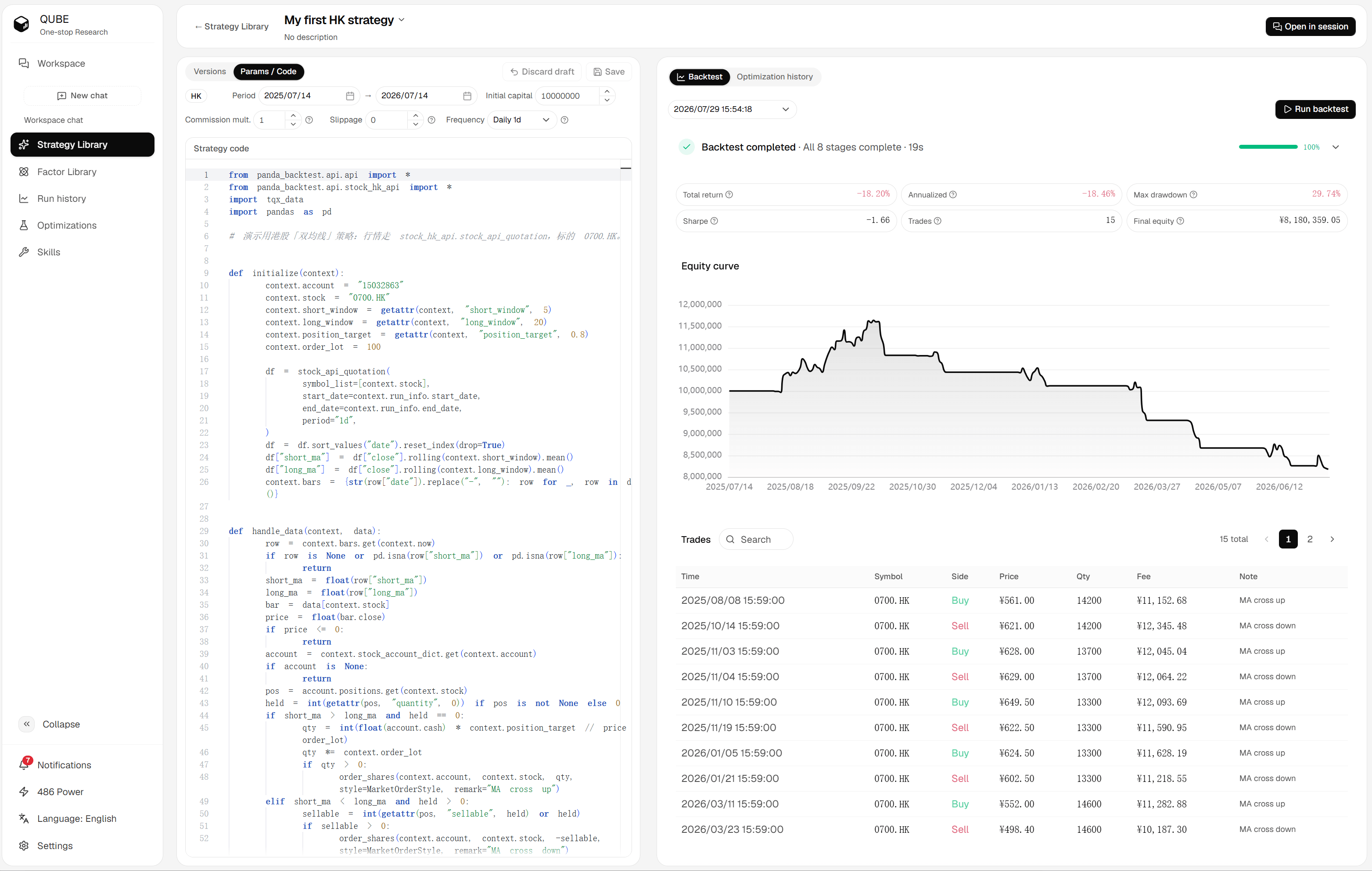
Strategy detail page with parameters, code, and backtest results
Parameters
If you do not specify a field, Qube uses the current market defaults. Keep the saved parameters with the version when you need a reproducible comparison.